January 30th: New Preview Alpha build available (1802.180129-1625)
January 31st: New Preview BETA & DELTA build available (1802.180129-1625)
HOW TO GET IT:
• If your console is in Instant-On mode and you have been selected to receive the update, it will download and install the update and reboot to standby.
• NOTE: Once the update is available to you, you can manually begin the update by launching the Guide and navigating to All Settings > System > Updates.
• If your console hasn’t downloaded and installed the update by 3:00 AM PST 1/31/2018 (12:00PM GMT 31/1), you will be prompted to do so at that time.
• This update has a shorter than usual amount of time before it becomes mandatory.
DETAILS:
OS version released: rs3_release_xbox_dev_1802.180129-1625
Available: 10:00PM PST 1/30 (6:00AM GMT 31/1)
NEW FEATURES:
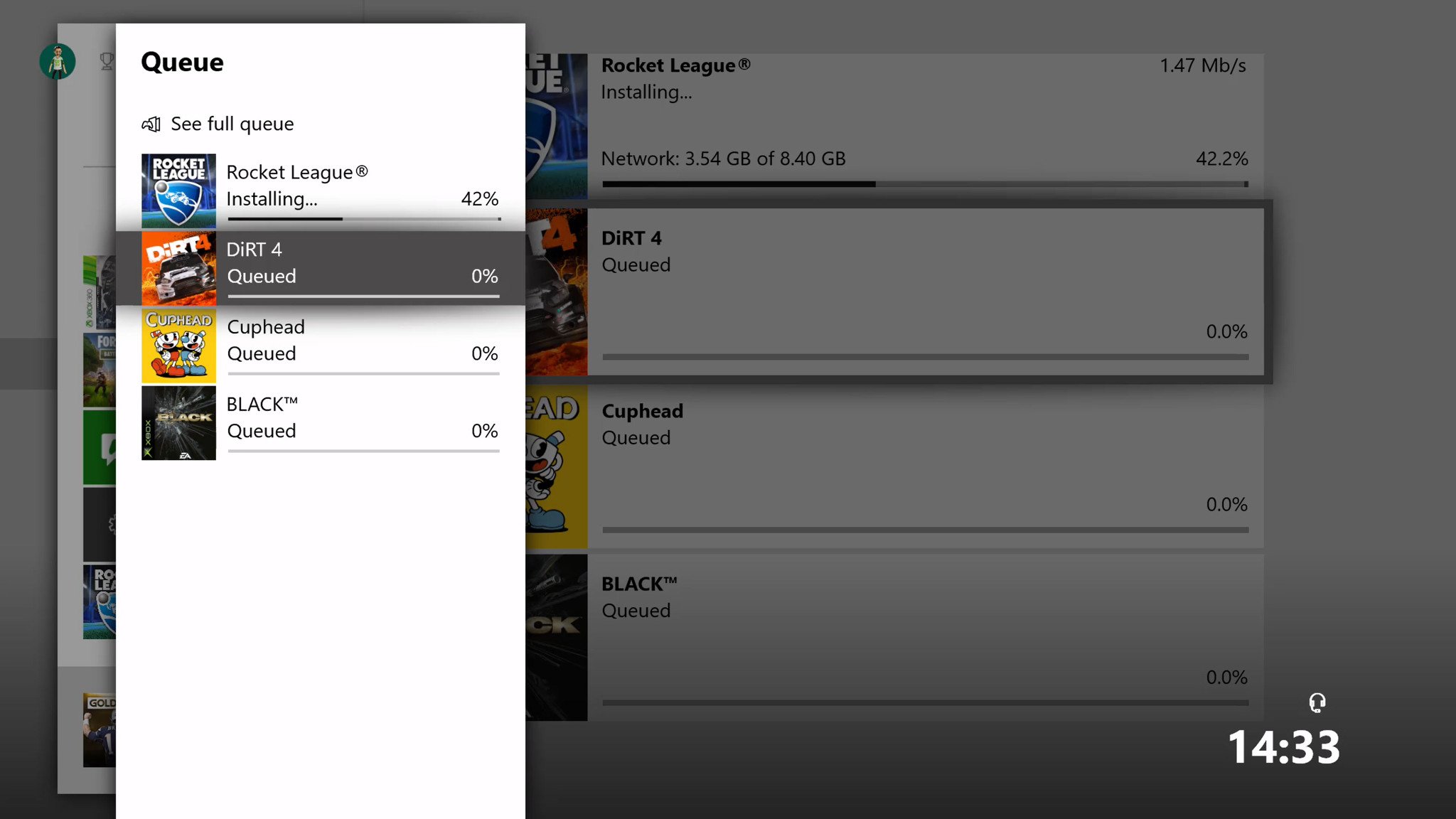
• Installation Progress in Guide
In-progress installations are now visible from a tile at the bottom of the Guide. When selected, this tile opens a new interface showing items in the queue and their status, and allowing some basic functions like pausing or cancelling the installation.
FIXES:
• Profile
Fixed an issue which caused some elements in Profile to appear misaligned.
• Home and Dashboard
Resolved an issue which sometimes caused unexpected crashes.
• Miscellaneous
Miscellaneous fixes and improvements.
KNOWN ISSUES:
• Games Installation
Games that are installed fail to launch.
Workaround: If the games are installed to an external drive please copy the game to the internal drive or attempt to delete the title and redownload to fix the launch error.
• Display
We are investigating the inaccurate RGB colors that have been reported when displaying in 4K HDR mode when playing a UHD disc.
• Tournaments
• The left and right navigation for selecting date and time during Tournament creation is currently reversed when the console language is set to Arabic or Hebrew.
• Left and right navigation in Tournament twists is reversed when the console language is set to Arabic or Hebrew.
• Left and right navigation in the bracket view of Tournaments is reversed when the console language is set to Arabic or Hebrew
• Avatars on Home
Users wishing to represent themselves as an avatar can do so by changing their settings under My profile > Customize profile > Show my avatar.
------------------------------------------------------------------------------------------------------------------------------------------------
January 31st: New Preview Alpha build available (1802.180130-1610)
HOW TO GET IT:
• If your console is in Instant-On mode and you have been selected to receive the update, it will download and install the update and reboot to standby.
• NOTE: Once the update is available to you, you can manually begin the update by launching the Guide and navigating to All Settings > System > Updates.
• If your console hasn’t downloaded and installed the update by 3:00 AM PST 2/1/2018 (11:00AM GMT 1/2), you will be prompted to do so at that time.
• This update has a shorter than usual amount of time before it becomes mandatory.
DETAILS:
OS version released: rs3_release_xbox_dev_1802.180130-1610
Available: 7:00PM PST 1/31 (3:00AM GMT 31/1)
FIXES:
• Games & Apps
Fixed an issue which sometimes caused certain Games & Apps content to be missing.
• Twitch
When opening settings while a Twitch stream is in progress, a black bar should no longer appear in the stream.
• Dynamic Theming
Fixed an issue which caused switching between Light and Dark themes to occur at incorrect times.
KNOWN ISSUES:
• Games Installation
Games that are installed fail to launch.
Workaround: If the games are installed to an external drive please copy the game to the internal drive or attempt to delete the title and redownload to fix the launch error.
• Display
We are investigating the inaccurate RGB colors that have been reported when displaying in 4K HDR mode when playing a UHD disc.
• Tournaments
• The left and right navigation for selecting date and time during Tournament creation is currently reversed when the console language is set to Arabic or Hebrew.
• Left and right navigation in Tournament twists is reversed when the console language is set to Arabic or Hebrew.
• Left and right navigation in the bracket view of Tournaments is reversed when the console language is set to Arabic or Hebrew
• Avatars on Home
Users wishing to represent themselves as an avatar can do so by changing their settings under My profile > Customize profile > Show my avatar.
---------------------------------------------------------------------------------------------------------------------------------------------------
February 2nd: New Preview Beta, Delta and Omega build available (1802.180131-1450)
HOW TO GET IT:
• If your console is in Instant-On mode and you have been selected to receive the update, it will download and install the update and reboot to standby.
• NOTE: Once the update is available to you, you can manually begin the update by launching the Guide and navigating to All Settings > System > Updates.
• If your console hasn’t downloaded and installed the update by 1:00 AM PST 2/3/2018 (9:00AM GMT 2/3), you will be prompted to do so at that time.
• This update has a shorter than usual amount of time before it becomes mandatory.
DETAILS:
OS version released: rs3_release_xbox_dev_1802.180131-1450
Available: 6:00PM PST 2/2 (2:00AM GMT 2/2)
NEW FEATURES for the OMEGA Ring:
Starting today at 6.00pm PST, Beta, Delta and Omega Insiders will begin to receive a new system update (1802.180131-1450). This update is new for the OMEGA Users and includes a variety of cool new features they can interact with and provide feedback on. Read on to learn more.
Next Achievements
With this update, you’ll be able to use the “Next Achievements” feature in the Guide, which enables you to view and sort a cross-games list of upcoming Achievements. Easily see which Achievements you are closest to, and quickly launch the game to obtain them. Sort filters allow you to prioritize next Achievements by closest, most common, rarest, most common rare, and highest Gamerscore. You can also hide/unhide a specific achievement or entire game from the Next Achievements section!
Mini Game Hubs
Mini Game Hubs are available in the Guide. With this feature, you’ll be able to access great content for the games you’ve played recently from a Game Hub without ever having to leave the action. Mini Game Hubs provide an easy way to see friends who are currently playing, upcoming Achievements, Looking for Group posts, and more. To find the Mini Game Hub, launch the Guide and look for a new icon to the right of all Game tiles in the Home section.
Do Not Disturb
Sometimes all you want to do is avoid all distractions and focus entirely on your game. This build has the new feature of “Do not disturb” online status, which will suppress notifications and let your friends know that you’re not available for another game or activity right now.
Open the Guide and select your profile icon to the far left.
Select My profile.
From the Appear online dropdown to the right, select Do not disturb.
Community Feed
We’re tweaking the community feed to make it easier to view comments. You’ll soon be able to see a peek of the most recent comment on community posts while viewing the activity in full screen. Comments are also being rearranged to place those that are most recent at the top. You’ll also be able to see who has liked your comments.
Power Settings
To address user feedback, we have added additional inactivity shutdown options to the Power mode & startup menu. In addition to shutting down the console after one or six hours of inactivity, you will be able to select options for two, three, four and five hours.
Navigate to Settings > Power & startup > Power mode & startup.
Under Options, select the “Turn off after” dropdown menu.
FIXES:
• Mixer
Fixed an issue which caused the Mixer app to crash when connecting a headset while the app is in use.
• General
Resolved an issue which sometimes caused degraded console performance in games, apps, and on the dashboard.
• Party Chat
Miscellaneous performance improvements for party chat.
KNOWN ISSUES:
• Dynamic Themes
We are disabling the Dynamic/Scheduled themes feature in this build. We will continue to work on this functionality for a future release. Thank you all for testing this feature and providing feedback.
• Games Installation
Games that are installed fail to launch.
Workaround: If the games are installed to an external drive please copy the game to the internal drive or attempt to delete the title and redownload to fix the launch error.
• Display
We are investigating the inaccurate RGB colors that have been reported when displaying in 4K HDR mode when playing a UHD disc.
• Tournaments
• The left and right navigation for selecting date and time during Tournament creation is currently reversed when the console language is set to Arabic or Hebrew.
• Left and right navigation in Tournament twists is reversed when the console language is set to Arabic or Hebrew.
• Left and right navigation in the bracket view of Tournaments is reversed when the console language is set to Arabic or Hebrew
• Avatars on Home
Users wishing to represent themselves as an avatar can do so by changing their settings under My profile > Customize profile > Show my avatar.

![[qmparto]](/images/smilies/net_quemeparto.gif "Que me parto!")
![[oki]](/images/smilies/net_thumbsup.gif "Ok!")
![[+furioso]](/images/smilies/nuevos/furioso.gif "muy furioso") ..
..![[fiu]](/images/smilies/fiu.gif "disimulando")
![[carcajad]](/images/smilies/nuevos/risa_ani2.gif "carcajada")
![[beer]](/images/smilies/nuevos2/brindando.gif "brindis")