NetWorx
Free bandwidth monitoring and usage reporting
NetWorx iconNetWorx is a simple and free, yet powerful tool that helps you objectively evaluate your bandwidth situation. You can use it to collect bandwidth usage data and measure the speed of your Internet or any other network connection. NetWorx can help you identify possible sources of network problems, ensure that you do not exceed the bandwidth limits specified by your ISP, or track down suspicious network activity characteristic of Trojan horses and hacker attacks.
The program allows you to monitor all your network connections or a specific network connection (such as Wireless or Mobile Broadband) only. The software also features a system of highly customisable visual and sound alerts. You can set it up to alert you when the network connection is down or when some suspicious activity, such as unusually heavy data flow, occurs. It can also automatically disconnect all dial-up connections and shut down the system.
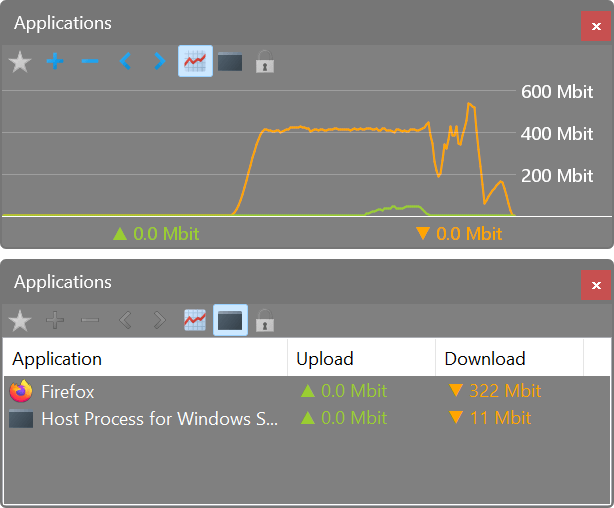
The incoming and outgoing traffic is represented on a line chart and logged to a file, so that you can always view statistics about your daily, weekly and monthly bandwidth usage and dial-up duration. The reports can be exported to a variety of formats, such as HTML, MS Word and Excel, for further analysis.

The key features of NetMeter Evo 2.0.0 are:
Customizable graph window which can react to mouse movement by fading in or out
Graph window can be made 'transparent' for mouse inputs so clicks get passed on to underlying control elements
Support for Logitech's G19 and G15 keyboard LCD displays. On the G19 display the graph is identical to the standard graph window. On the G15 a simplified graph is being displayed with upload on the top and download on the lower half of the screen.
Graph window can be minimized to system tray and to a Logitech LCD

Powerful Bandwidth Meter
Net Meter Pro monitors your computer's internet and network bandwidth usage and displays network traffic information in realtime. You can SEE the network and bandwidth meter data flowing to and from your computer with dynamic real-time data graphs.
TRASTARO escribió:¿NetMedic, donde estas?
Que increible programa era ese y me parece aun funciona en XP y windows 7.
alextgd escribió:Vamos que este descargando dump de noseque sitio durante 2 dias? igual esta dificil.
#coding=utf-8
import os, urllib, time
url = ''
path = os.path.dirname(os.path.realpath(__file__))
t0 = time.time()
u = urllib.URLopener()
u.retrieve(url, '%s/test' % path)
t1 = time.time()
size = os.stat('%s/test' % path).st_size / 1024
speed = size / (t1 - t0)
os.remove('%s/test' % path)
with open('%s/log.txt' % path, 'a') as f:
f.write('%s\t%.2f kB/s\n' % (time.strftime('%Y/%m/%d %H:%M'), speed))TRASTARO escribió:Es facil buscar donde descargar NetMedic, eso no es problema.
Supongo que lo que quieres es un programa que te cree un log o reporte, eso ya seria un programa de administracion y control de redes. Que por cierto, cualquiera de esos programas te da la respuesta instantanea y real de la velocidad a la que bajan o se suben datos [netmedic me encantaba porque podia monitorear los puertops serial o paralelo aparte del modem y de red]